The internet is like a double-edged sword—it offers endless opportunities for learning, creativity, and connection, but it also hides potential dangers. For children and teens, these risks can vary greatly depending on their age and maturity level.
That’s why age-appropriate internet usage guidelines are essential for parents, guardians, and educators. With the right balance of supervision, education, and independence, we can help kids make the most of the digital world while staying safe.
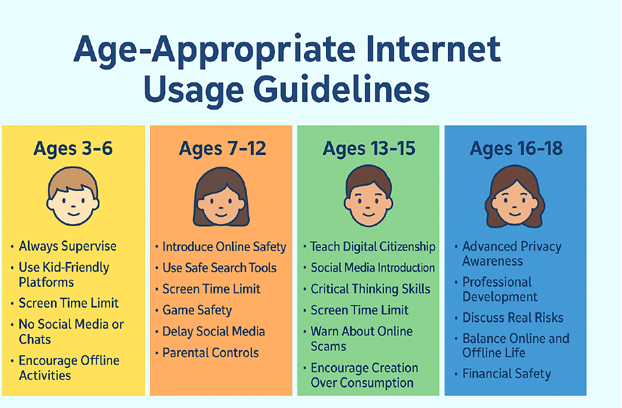
Ages 3–6: Early Childhood (Preschoolers)
Focus: Exploration and learning in a safe, supervised environment.
- Always Supervise: Sit with children when they’re online.
- Use Kid-Friendly Platforms: YouTube Kids, PBS Kids, Khan Academy Kids.
- Screen Time Limit: 30–60 minutes a day.
- Teach Simple Rules:
- Don’t click unknown links.
- Ask before downloading anything.
- No Social Media or Chats: Keep interactions offline.
- Encourage Offline Activities: Play, art, and reading should balance screen time.
Ages 7–12: Primary School (Tweens)
Focus: Building basic digital skills and safety habits.
- Introduce Online Safety:
- Never share personal details (name, address, school).
- Ignore messages from strangers.
- Use Safe Search Tools: Kiddle, Google SafeSearch.
- Screen Time Limit: 1–2 hours daily.
- Game Safety: Choose age-appropriate games; set playtime rules.
- Delay Social Media: Most platforms require users to be 13+.
- Parental Controls: Filter harmful content and track activity.
Ages 13–15: Early Teens
Focus: Encouraging responsibility and positive online behavior.
- Teach Digital Citizenship: Respectful communication, avoiding plagiarism, and preventing cyberbullying.
- Social Media Introduction:
- Set strong privacy settings together.
- Only connect with people they know in real life.
- Critical Thinking Skills: Verify information before sharing.
- Screen Time Limit: 2–3 hours daily.
- Warn About Online Scams: Recognize suspicious links, offers, and downloads.
- Encourage Creation Over Consumption: Blogging, coding, or making videos.
Ages 16–18: Older Teens
Focus: Independent use with guidance and accountability.
- Advanced Privacy Awareness: Data collection, cookies, and managing a digital footprint.
- Professional Development: LinkedIn profiles, online courses, and networking.
- Discuss Real Risks: Identity theft, phishing, and cyberstalking.
- Balance Online and Offline Life: Time management skills.
- Financial Safety: Secure online payments and avoiding online gambling.
- Peer Mentorship: Guiding younger students on safe internet use.
Universal Tips for All Ages
- Keep devices in common family spaces for younger users.
- Have open, ongoing conversations about online experiences.
- Follow the “Pause and Think” approach before clicking or posting.
- Lead by example—your online behavior shapes theirs.
Conclusion
Teaching children about safe internet use isn’t a one-time conversation—it’s a continuous process that evolves as they grow. By tailoring rules and guidance to their age and maturity, we give them the tools to navigate the online world with confidence and caution.